
How to Create a Pop Out Of Your Phone Video
Have you seen those videos where someone appears to jump right out of a phone screen and wondered how they made it? You can create that pop-out effect in CapCut using a video you record on your phone and a simple green-screen phone image. You do not need to film anything complicated. The effect comes from layering your clips in the right order and removing parts of those layers so your body appears to move from inside the phone to in front of it. If you want to learn how to make a pop-out video in CapCut, this tutorial walks…
How to Ensure Your Text on Reels Never Gets Cut Off
Have you ever posted an Instagram Reel and realized some of your text is hiding behind the Like button or other elements on the screen? It can be hard to tell exactly where your text will land while you’re creating the Reel. Something can look perfectly placed while you’re editing, then become harder to read once the Reel is posted. If you use Instagram’s Edits app, there is a simple way to keep text from getting covered on Instagram Reels. Edits has two settings that show you where the safe area of your screen is while you’re working. Use Frames…
What’s the easiest way to convert currency or units on the go?
Did you know your iPhone Calculator can do more than basic math? It also has a built-in conversion tool that can quickly convert currencies and measurements without making you hunt around for another tool. This can be especially handy when you’re travelling, following a recipe written in metric measurements, or trying to understand a measurement you don’t normally use. In this video, I’ll show you how to convert currency and units on the iPhone Calculator using the Convert feature. You’ll see where to find it, how to choose what you want to convert, and how to switch between different types…

How to Handle a New Lead Who Thinks You’re Too Expensive
One of the biggest questions I’ve been getting lately has been about pricing. If you’re a service provider, I’m betting that at some point you’ve either received an email after you sent a proposal or had someone tell you flatly and outright that you might be out to lunch with your pricing. It’s possible you’ve even had people go radio silent and ghost you once you explain your rates. If that’s you, congratulations! It means they see tremendous value in what you do. They are simply uneducated about why it costs what it costs. You’ve got an incredible opportunity here…
How to Enable Accessibility Features to Make it Easier on Your Eyes?
If looking at your iPhone screen is getting harder on your eyes, there are built-in settings that can help. You may find bright white screens uncomfortable, have trouble reading text, or simply wish your phone could read something aloud instead of making you struggle to see it. In this video, I show you how to make your iPhone easier to see using three accessibility features already available in your settings. These changes can help reduce the amount of bright white you see on your screen and give you another way to read texts and other content when looking at the…
How to Blur People Out of a Video
Have you ever recorded a video you’d love to share, only to realize there’s someone in it whose face you shouldn’t post? Maybe it’s your grandchild, another person’s child, a client, or simply someone who didn’t agree to be on social media. You don’t necessarily have to scrap the whole video. If you’re wondering how to blur faces in a video using the Edits app, there’s a way to hide a person’s face while keeping the rest of your video intact. The Edits app can identify and track a person in your clip, then let you apply a blur effect…
How to Upload Custom Fonts to Edits
Want to use your own font inside the Instagram Edits app instead of sticking with the fonts already there? You can upload custom fonts to Instagram Edits directly from the Files app. If you’ve purchased or downloaded a font, the process involves downloading the font file, finding it in your Downloads folder, and then importing it into Edits. It may sound a little complicated if you’ve never dealt with font files before, especially when you open the folder and suddenly see file types like OTF and TTF. The good news is that Edits can work with either format, so you…
How to Find You iPhone When it’s in Silent Mode
Do you keep your iPhone on silent and then spend ten minutes wandering around the house trying to remember where you left it? You can use Find My iPhone, but there’s another option if you want a quick way to make your phone get your attention. Using the Shortcuts app on your iPhone, you can create an automation that responds when your phone receives a specific text message. If you’ve been wondering how to find a lost iPhone on silent, this video shows you how to set up that shortcut step by step. Make Your Lost iPhone Play Music Automatically…
How to Bold, Underline, or Italicize Text on iPhone Messages
Have you ever wanted to bold a word in a text message, underline something important, or add italics for a little extra emphasis? Your iPhone has built-in text formatting tools that many people never notice. When you’re writing an iMessage to another iPhone user, or typing in the Notes app, you can format individual words or sections of text instead of leaving everything the same. If you’ve been wondering how to format text on iPhone, you don’t need another app or a complicated workaround. The controls are already there. You just need to know where Apple tucked them away. This…
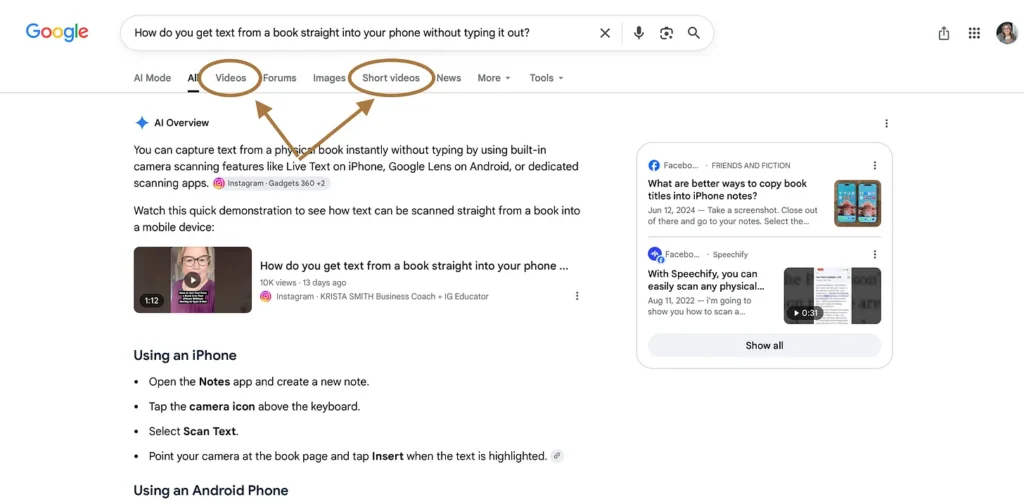
How do you get text from a book straight into your phone without typing it out?
If you want to create Instagram Reels but feel like your ideas, saved posts, videos, and inspiration are scattered everywhere, Instagram’s Edits app can help bring more of that process into one place. But when you first open the app, there are quite a few buttons and sections to figure out. If you’re wondering how to use the Edits app and what all those different tabs actually do, this beginner-friendly video will give you a simple tour before you start editing. The Edits app isn’t only a video editor. It also includes tools for saving content ideas, finding inspiration, accessing…
How to Add Instagram to Google Search Console: Beginner-Friendly Tutorial
Want to know if your Instagram, TikTok, or YouTube content is showing up in Google Search? Google Search Console now lets you add your social media profiles as platform properties so you can see how your content is performing in Google Search. In this tutorial, I’ll show you how to connect your Instagram, TikTok, and YouTube accounts to Google Search Console and where to find the data once they’re connected. You’ll learn how to see: • Which social media posts are appearing in Google Search• How many impressions and clicks your content is getting from Google• What people are searching…
How to Use Your iPhone as a Microphone
If you record videos on your iPhone but don’t have an external microphone, you may be surprised by how much you can do with the audio tools already built into your phone. In this video, I’ll show you how to make iPhone audio sound better without a microphone by changing one camera setting before you record and then adjusting the audio afterward. This is especially useful if you’re creating Reels, social media videos, tutorials, or other talking-to-camera videos and want cleaner, more polished sound without buying more equipment. Use your iPhone’s built-in audio tools after you record Your iPhone gives…
How to add a slow zoom in your talking head videos!
If you’ve seen talking-head videos where the camera suddenly punches in for a second or slowly zooms closer while someone is speaking, you might be wondering how they’re doing it. The good news is you don’t need to record your video from different camera angles. You can create those changes while editing one video clip. In this tutorial, I’ll show you how to add zoom effects in the Edits app, including both a quick zoom-in cut and a slower, smoother zoom. These small changes can add a little more visual interest to a simple talking-head video and help hold someone’s…
How to Upload a YouTube Short on Phone
If you’re already creating Reels for Instagram, you don’t necessarily need to make brand-new videos for YouTube too. You can take content you’ve already created and upload it as a YouTube Short, giving that same video another chance to reach people. Learning how to repurpose Instagram Reels as YouTube Shorts is especially helpful if you’re trying to be more consistent with your content without spending even more time filming and editing. Instead of thinking of Instagram and YouTube as two completely separate jobs, you can use one piece of short-form video content in more than one place. How do you…
How to adjust the volume on your Instagram Reels
Have you ever added music to an Instagram Reel only to realize you can barely hear yourself talking anymore? Or maybe the music is so loud that it competes with the original sound in your video. Instagram lets you use both the audio from your original video and a music track, but you may need to adjust the volume of each one so they work together. The controls are easy to miss if you don’t know where Instagram has tucked them away. If you’re wondering how to adjust audio volume on Instagram Reels, this video shows you exactly where to…
What Exactly is AEO (Answer Engine Optimization) and What Do I Need to Know About It?
In the past two weeks I’ve had no fewer than three women send me DM’s and asking me what magic I’m doing behind the scenes because they put a question into AI (Chat GPT and Claude, but the same is true for Gemini, Perplexity and other AI models), and somehow my Instagram reels showed up to answer their question. Clicking on the video linked in the answer led them to check out the video in question, which led them to check out a few others on my feed since it was an Instagram linked Reel they were served. They obviously…

What It Looks Like When a Business Community Shows Up for One of Its Own
I have at least one call every single week with my community. It’s a general Q&A, come as you are, ask-me-anything -live kind of call. Right now there are about a hundred women who have access to that room, and if you’ve never run something like this, I don’t know how to explain what it does to you to watch the same faces show up week after week. You go from a hundred strangers scattered across the planet to a hundred women who know each other’s businesses, each other’s families, and even each other’s moods! I’ve known this community was…
How to Add Links and Share Stories or Add Context
You sit down to write. You know what you want to work on. And then suddenly you’re checking your phone, making tea, rereading the same paragraph, or wondering why writing feels so much harder than it did yesterday. If you’ve ever wondered how to get into a flow state when writing, it helps to understand that flow isn’t something you can force. It’s part of a cycle, and what happens before and after a focused writing session can affect how easily you find that rhythm again. In this workshop, book coach and writer Natalie Polson explains the brain science behind…
Pity Party vs. Pity City: What Grief Taught Me About Getting Unstuck in Business
Last Tuesday night I was just watching some random fluff movie on Netflix. It was the story of some hometown hero who went off and became a bigwig and then came back to his hometown and found his old girlfriend and fell back in love. I picked it because it was simple and light and that’s kind of what I was feeling like I needed. What I didn’t comprehend was that at some point in the movie, we find out the real reason he left his hometown and went out into the big world in the first place. It was…
How to Add a Lead Magnet to a Substack Post Step by Step
If you’re using Substack to grow an email list, asking people to “subscribe” may not always be enough. People are far more likely to hand over their email address when they understand what they’ll get in return. That’s where a lead magnet can help. A lead magnet is a useful free resource you give someone in exchange for subscribing. It could be a PDF, guide, checklist, quiz, or another resource your ideal reader actually wants. But if you’re wondering how to add a lead magnet to Substack, there’s a clever way to set it up directly inside your posts so…
How to Add a Lead Magnet to SubStack
Most of the people who land on one of your SubStack articles might not be subscribed yet. They may have found your publication or article after googling, asking AI, or a friend recommended you check something out. If you don’t give them something to do in that moment to encourage them to become a subscriber, they may very likely read it, nod along, then probably close the tab and you might never see them again! How sad is that? You had their attention for three whole minutes and got nothing out of it. A lead magnet inside your post catches…

How to Stop Overthinking Your Content (When You Already Know What to Post)
I want you to meet a woman I’m going to call Linda. She’s not one person. She’s about fourteen of them, mashed together, which means if you see yourself in her, you’re in very good company. It’s Tuesday morning and Linda finally asks her question out loud. It’s directed at the person she pays to answer these kinds of questions. Her hands are a little sweaty, though that could be the question or it could just be Tuesday, hard to tell these days. She asks what she should focus on first, Instagram or her email list. The answer comes back…
Why isn’t social media getting me clients?
Are you posting on Instagram, getting some views or followers, but still not getting clients? It’s easy to assume the answer is more followers. So you spend more time making content, trying different hooks, learning Reels, and tweaking your Instagram bio. But if people are seeing your posts and still not buying, more visibility may not be the piece you’re missing. This is especially frustrating when you’ve been taught that online business works like this: post content, grow your audience, and eventually make money. The problem is that social media is only one part of the bigger marketing system. Why…
Should I Monetize My Substack? Answer These 3 Questions First
I’ve had probably fifteen of you message me in the last month asking the same question. At the exact same time, my own feed is flooded with people teaching exactly that, how to get your first paid subscribers, how to price your Substack. The Substack gold rush is officially on. Here’s what I notice happening in your brain when you see that. “Oh my gosh, this is it. This is the thing. I can write and people will pay me. This is what I’ve been waiting for!” I get it. I really do AND I want to slow you down for…

If You Still Hit the Space Bar Twice After a Period, This One’s for You
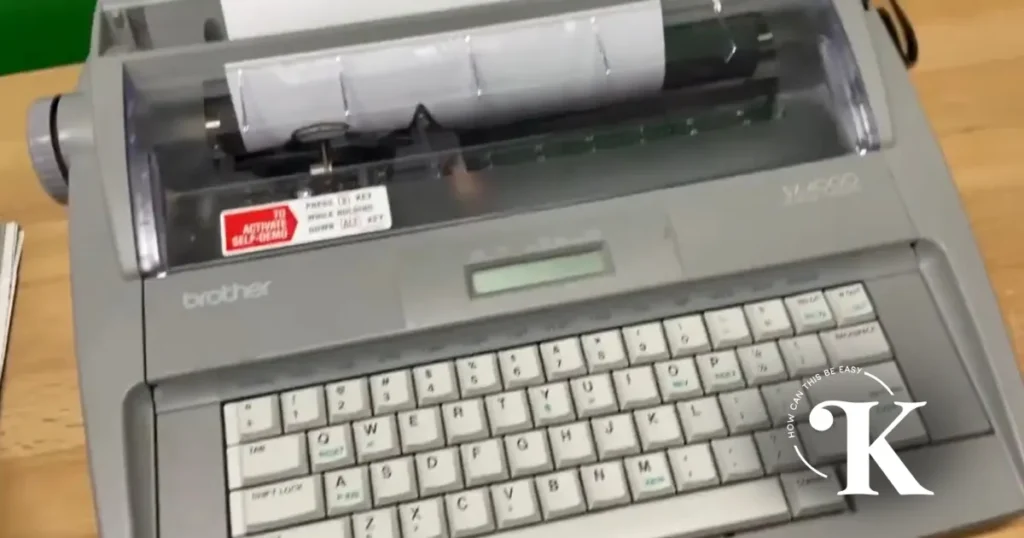
I’d bet money you still do it. Period, space, space is insanely automatic for women born before 1980 with almost no thought involved on your part. It drives web designers and developers like me crazy because I have to search and replace to remove all of them before I can add content to a website, often adding hours to a project. Most of you never had a reason for it to wear off. 1987, and a Trip to Kmart Imagine it’s October, 1987. That also happened to be the fall before I left for teacher’s college and needed a typewriter…
If You Still Hit the Space Bar Twice After a Period, This One’s for You
I’d bet money you still do it. Period, space, space is insanely automatic for women born before 1980 with almost no thought involved on your part. It drives web designers and developers like me crazy because I have to search and replace to remove all of them before I can add content to a website, often adding hours to a project. Most of you never had a reason for it to wear off. 1987, and a Trip to Kmart Imagine it’s October, 1987. That also happened to be the fall before I left for teacher’s college and needed a typewriter…

5 Things I’d Do Differently If I Was Building a Business in 2026
If I were starting from scratch in the online space in 2026, knowing everything I know now, there are five things I would do completely differently. Let me be clear: I don’t think what I did before was wrong, but I wasted a lot of time on things that felt productive and they really were not and I see women doing the same things every single day. Let’s dive in. Here’s my honest list. I’d develop one core message and I’d repeat it constantly. I wouldn’t spend time developing content pillars or try to find a new angle every week.…
The Cheese Maker Who Forgot About Her Neighbours: A Fable About How to Grow on Social Media
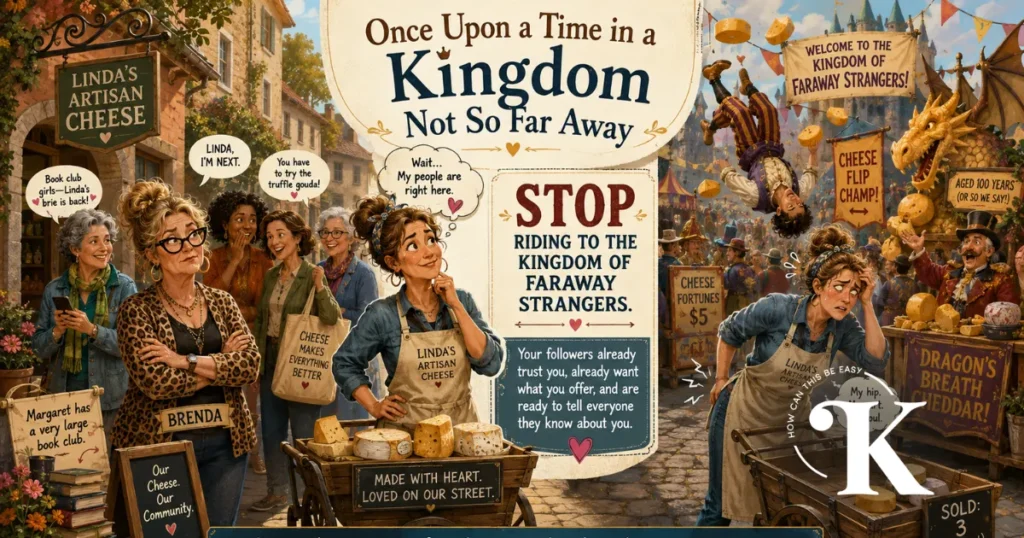
Once upon a time in a kingdom not so far away, there lived a woman named Linda who made the most magnificent cheese. Her cheese was so good that the villagers who lived on her street would weep actual tears when they tasted it. They brought it to dinner parties. They tucked it into their children’s lunches. They whispered about it at the market. One woman, Brenda from two streets over, had been known to hide a wedge of it in her handbag just in case of emergencies. Linda knew she had something special. So she did what any ambitious…

How Perfectionism Becomes Avoidance (And Why It’s Costing You Clients)
A few weeks ago I was running a free challenge teaching my audience how to set up and use Claude properly. During the Q&A someone asked me if I ever upload my videos to Claude and ask it to critique them. I answered as directly as I could. No. Never. Not in a million years. There were a few chuckles in the room and I followed it up with the truth. Here’s what I meant by that. The Loop Nobody Talks About When you let AI tell you what’s wrong with your video, you start fixing things. Then you fix…
How My Client Got 4.4 Million Views in Under 24 Hours
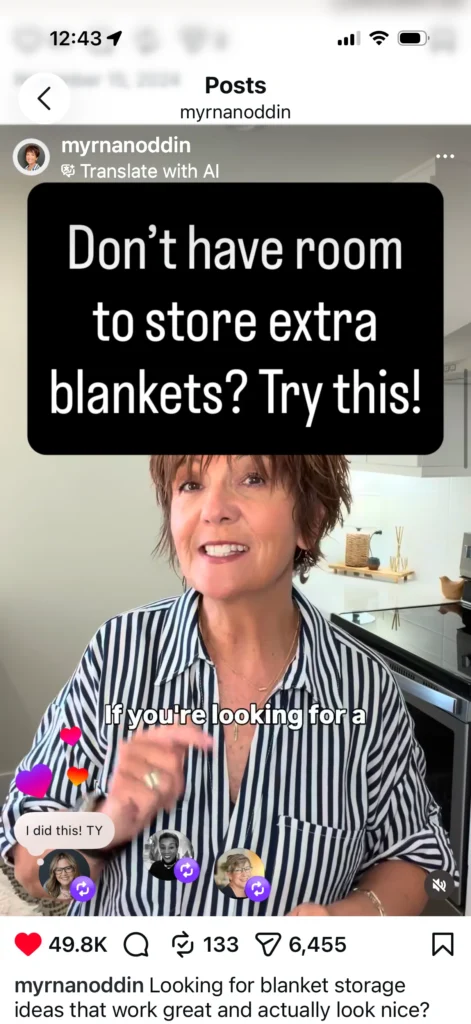
One of the women in my community posted a Reel 24 hours ago. It currently has 4.4 million views. At this moment of writing it has: 133 reposts. 6,455 shares. A staggering 11k saves and a whole lot of new followers (4704 new followers in 24 hours) and others landing on her page because of it. This will grow. Her name is Myrna and here’s the part that might surprise you. She posts once a week. One Reel. Every Thursday. That’s it! I want to tell you exactly how that works, because it goes against almost everything you’ve been told about…
